
Today was a bit pricy. I ordered a new adjustable height desk to put under a new 27 inch 2017 iMac.
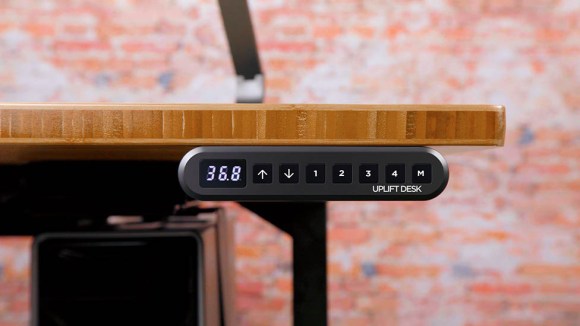
My ancient trestle dining table desk is always at the wrong height for work so I decided to treat myself to an adjustable desk from The Human Solution in Austin, Texas. The desk I chose was a 30×60 radiused front bamboo top on an adjustable trestle base like that shown above. An electric drive lets you easily move the desk to one of 4 preset heights and even tells you how high the work top is.
The New iMac
After some poking around at the Apple Store and some on-line reading, I chose a new 27 Inch i7 iMac. Apple makes it tricky as they never change just one thing from model to model. I use my machine primarily for photo and video editing, at least that’s my design basis usage. In reality, it spends its boring life writing this blog.
When fan boys are talking about computer hardware, they are usually speaking about how well the part games. I’m not a gamer so most of their observations are irrelevant. Gaming workloads are unique and are tuned to nVidia graphics by and large.
Apple places a premium on how well the hardware supports OpenCL application computing with graphics rendering a secondary consideration. OpenCL performance is the primary consideration in video and audio rendering. Cryptography support is increasingly important as data is encrypted at rest and decrypted on the fly.
What Apple Changes
From model to model in a line, Apple changes the display, the graphics hardware, storage, and the processor. This means that there are sweet spots in the product line but it also means that upgrading one capability may require accepting additional changes. When you look at the fan-boy discussions on-line, the posters tend to focus on one aspect of the machine without much regard to what it would be doing or that it would be doing several things at once. I thought I’d take a deeper look in this article.
The graphics chipset is the primary differentiator of the 27 inch 5K Retina iMac line. The display and display hardware must be chosen at time of purchase. The processor, memory, and storage can be changed in the field although only memory updates are easy. Storage and processor updates require dealing with the double sided tape holding the iMac together. Of the two tasks, updating the storage is easy. Tinkering with the processor is less easy as Apple has tailored the cooler to the specific processor it uses.
Display
Apple offers 4K and 5 K retina displays in the iMac. The 4K display is more than adequate for general use. The 5K display is aimed primarily at those working with large images. The big display has room for a full 4K video frame with additional pixels for the video editing menu. The display can’t be changed in the field. The iMac’s current USB-C/Thunderbolt interfaces can drive an external 4K display but not an external 5K display. Thunderbolt 3 does not quite have the bandwidth for the 20% larger display.
If you tend to hang on to a machine like I do, opting for the 5K display will give a longer service life. This was the one place where commenters had expressed regret, settling for the 4K display when working as a video producer.
Video
Apple makes three versions 5K Retina iMac best identified by the graphics part used. The three models use the Radeon 570, Radeon 575, and Radeon 580. Reports are that the Radeon 580 chip gives the most crisp rendering experience with the 5K display. This shows up as a smoother control experience when using brushes and other direct manipulation tools in Adobe Lightroom or Phase One Capture One.
In the Radeon 580 variant, Apple ups the video memory from 4 GB to 8 GB. It is believed the bump in video memory is responsible for the improved interaction. The amount of video RAM cannot be changed in the field. I opted for the 5K 580 graphics hardware.
Processors
Apple offers Intel Core i5 and Core i7 processors in the iMac. Both processors have 4 execution units but differ in cache architecture (arcane) and availability of hyper threading. With 4 cores, these machines will be able to process network traffic, play music, send content to Air Play, etc without affecting user interaction. They are well quipped to “walk while chewing gum”.
Hyper threading
Intel hyper threading adds a second prefetch, decode, and execute queue to a core that allows it to work concurrently on two threads from a single process. A modern application has several threads. One is running the user interface event loop. This thread receives mouse and keyboard events that it dispatches for processing. Any graphical program will have this thread.
Depending on its purpose, a program may have additional work threads. For example, the simulation I worked on had 3 threads, one for the user interface, one that took simulation time steps, and a third that exchanged information with other simulation instances collaborating to run the problem.
As I understand it, hyper threading adds a second program counter (program status word) and user register set that supports the second thread but the two threads share the memory address mapping, cache, and processor execution units.
One CS lecturer used the example of one thread using the integer unit while the second used the floating point unit. If both threads needed the integer unit, they would be taking turns. This is not as bad as it sounds since the integer unit is pipelined and has several instructions in the works at once. Once you have multiple functional units, instruction reordering, and register renaming hardware in place, the second set of user registers and hyper threading logic produces a 10 to 30 percent performance gain for a smaller increase in the core’s complexity.
I opted for the i7 with hyper threading over the i5 without. Mostly because my Core 2 Duo mini was a dog rendering in iMovie. I felt I would keep the i7 machine longer and it would have a better second life when Apple finally removed OS update service. This choice made the 2 TB Fusion drive standard.
Storage
Most PC applications have relatively low disk I/O demands. Typical applications read the document into memory, operate on it there, and write it to disk in its entirety at save/close. There are two notable exceptions, software development and video rendering. Compiling and library updating using traditional Unix compilers tends to be a disk write intensive task. Video rendering is also disk write intensive.
The Radeon 570 and Radeon 575 iMac base storage is a 1 TB Fusion Drive. A Fusion Drive is a MacOS mashup of a regular 1 TB electromechanical disk (EMD) and a solid state disk 24 GB (SSD) at the operating system level. MacOS creates a single virtual volume from the two physical devices and migrates the most recently used files between the EMD and the SSD. Basically, the SDD behaves like a persistent buffer cache for the EMD. Things recently read or written are in the SDD and shadowed on the EMD.
Apple offers a 2 TB Fusion drive as base storage for the Radeon 580 iMac. This disk combines a 256 GB SSD and a 2 TB 7200 RPM EMD. The disk speed will make a difference for tasks that produce long streams of data to write to disk. As the application writes, data goes first to the buffer cache, then to the SSD and from there to the EMD. If the volume to be written exceeds the SSD free space, long sustained writes characteristic of video rendering will eventually drop into equilibrium with the EMD’s ability to put data away on disk.
Apple uses standard 3.5 inch disk drives and M.2 SSD modules but does not make them accessible for user replacement. iFixIt makes repair and upgrade kits available including the proper double sticky tape needed to close the iMac. Opening an iMac and replacing drives in the field is doable but be advised that working with the sticky tape is time-consuming and may be a bit tricky. Apple techs get lots of practice at this.
After fiddling around with the Radeon 580 5k Retina 27 inch iMac, I concluded that the standard 2 TB Fusion Drive would be adequate for my needs. This device is much bigger than the 512 GB SSD in my Mac Mini and the 256GB cache SSD was big enough that it would be a long time before I outgrew it.
Memory
Apple starts all configurations out with 8 GB of main memory. This is generally adequate for writing, drawing, and photo editing. Interestingly, Apple makes the memory accessible and field replaceable behind a trap door. I ordered the base memory and opted to add 16GB in the field should it be needed. That would give a total of 24 GB in the machine.
An Aside on SSD’s
SSD’s work their magic by eliminating rotational and seek delays but current NAND flash devices have finite but high write lifetimes. As the number of times a block has been written approaches the design life, the probability that it will fail goes up. The operating system should sense the error, mark the block bad, and write the data to a new block from the free pool. When enough blocks are bad, the disk will become unusable. I have not personally experienced an SSD failure so I can’t comment from first hand experience here as disk writes are low in my read-dominated disk workload.
This observation is important to video editors. SSD’s used for fast rendering should not be used for asset or product storage as the disk will eventually reach the end of its design life. Many video editors render to external SSD. Economics dictate the fastest sustained writing rates and replacing this device frequently is affordable for the professional video editor.



 Dismal Manor Dispatches
You must be logged in to post a comment.