I’ve been seeing a lot of whines posted to TrackR Bravo adverts on Facebook. These seem to be from people who bought one or more TrackR Bravo devices expecting magic. Their things would just appear on the app map.
TrackR Whines on Facebook
I’ve been seeing a lot of whines posted to TrackR Bravo adverts on Facebook. These seem to be from people who bought one or more TrackR Bravo devices expecting magic. Their things would just appear on the app map.
Bluetooth item trackers are all the rage if the Interwebs are to be believed. These gadgets are dog tag sized devices designed to be tucked into a wallet, stuck to mobile items, or added to a key ring. They are basically Bluetooth 4 beacon devices that advertise their presence. To be an item tracker, they need to do little more. Just play Marco Polo with a mobile or other compatible Bluetooth device. About 5 or 6 companies make these things with another entering the market every few months. Most fundraiser on Indigogo so that is a good place to keep an eye peeled for new developments in this space.
The first is a link to a TrackR Bravo referral code. The second is a link to the Indigogo campaign of the European upstart mentioned below. One of the perpetrators designed Steve Jobs yacht. The third is a link to the TrackR Atlas Indigogo campaign. The fourth is Wikipedia on Bluetooth 4.0 protocol.
Things are highly fluid in this space, especially with the application. Most brands get the hardware right and the app usable then go to market. Once launched, they continually improve the app to fix problems and refine the user interface. Last season’s review on Engadget or Gizmodo will not reflect the current product experience.
My personal opinion is that the advertising copy writers are overselling these devices but that they can be useful if you understand their capabilities and limitations and use them within those capabilities and limitations. I’m writing this article to offer you my understanding of these devices and their application in hopes that this will spare you some disappointment and help the product category find its niche.
Apps and beacons don’t currently interoperate. It would be nice if a single app would support multiple beacon families because manufacturers are tailoring the devices for different applications using different packaging. For example, one is credit card sized for use in wallets. Another is packaged for pet tagging. Some are thicker to have longer battery life.
The Bluetooth beacons don’t work well enough to serve as a wander alert for people or pets. The desire to keep them low power and small prohibits putting a GPS receiver and cellular radio in the device which means that location must be indirect. When a receiver hears a beacon, it reports its position and the beacon ID to HQ and HQ notifies you if it is one of yours. This is what TrackR calls “crowd GPS”. It is not a substitute for the real thing when it comes to life safety.
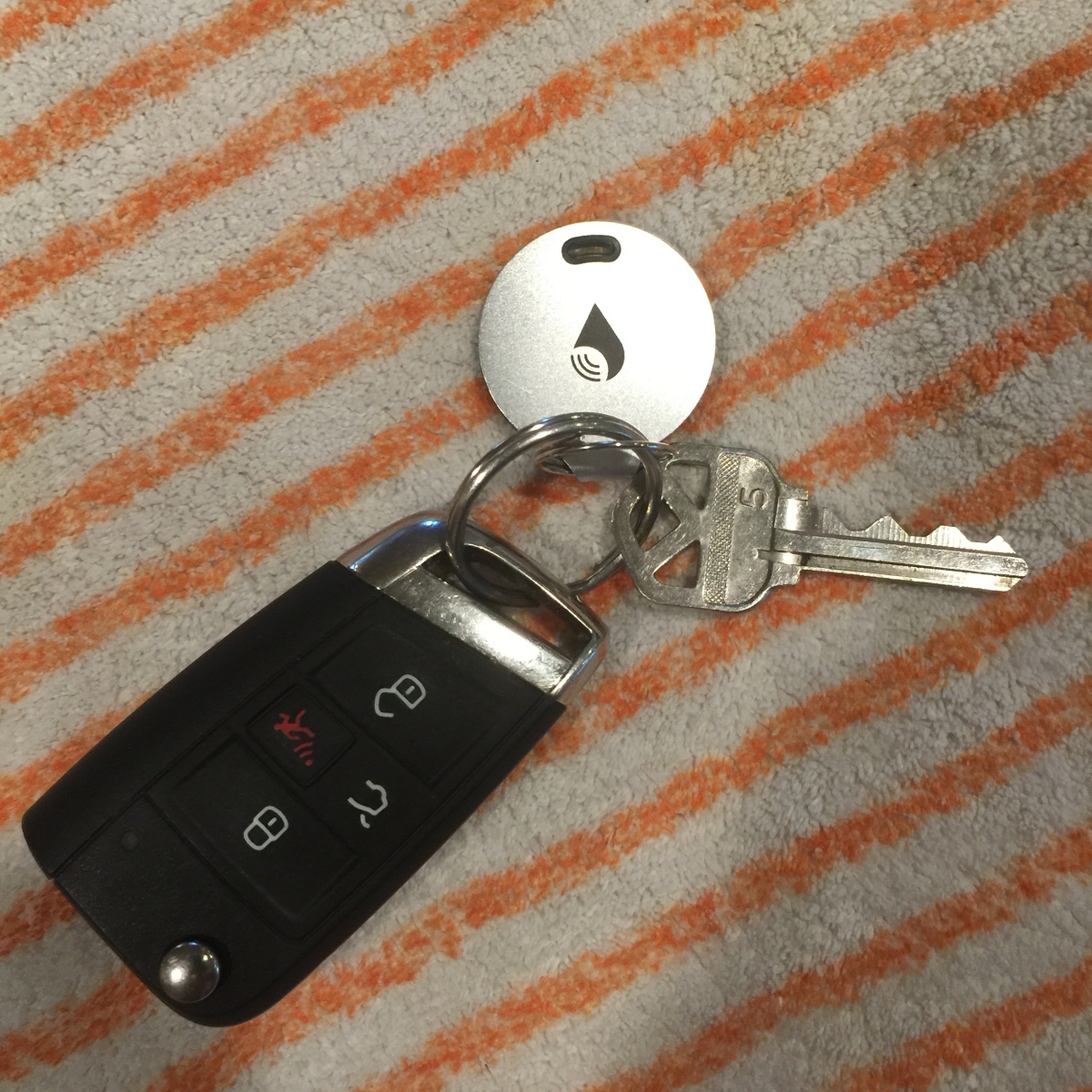
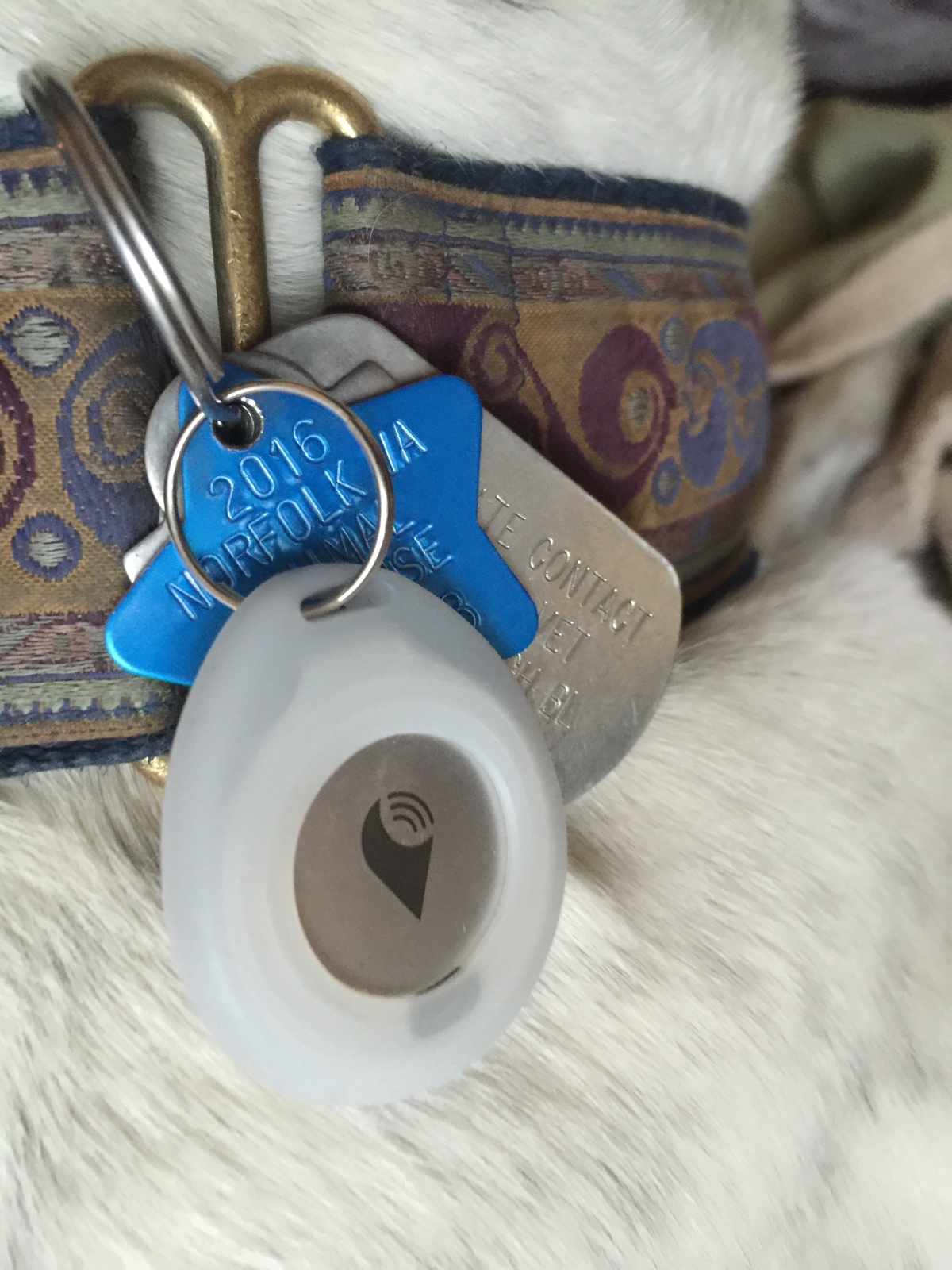
TrackR, one of the better known brands in the US, held a buy one get one sale between Thanksgiving and Christmas. Having purchased a new car that has high tech keys, and having successfully laundered one of my two keys (it lived, this time), I decided some precautions are in order. Can a Bluetooth tracker be helpful? So I bought 2 pair, one to go on the keys and one to go on the houndies.
My trackers arrived shortly before Christmas so I downloaded the app, set up the trackers one at a time so that they would actually be attached to the things they were named for, and gave them a try.
The pairing process is simple. You download the App, get an account from the manufacturer, and pair each critter. The pairing starts with the app and the mechanics are app specific. Basically, you tell the app to listen for a tracker, you press a button on the tracker to start it advertising, and the app finds and logs the device. The app will ask you to name the device. Once the device is named, setup is complete and you can move on to the next.
The beacons announce themselves and listen for the controlling terminal. On command from the controlling terminal, they begin chirping. On a second command, they stop chirping. The beacons are always announcing at a low rate to save battery while allowing themselves to be detected
The controlling terminal listens for the beacons. The Bluetooth 4 protocol lets the beacon report the transmitted power. The receiver includes the received signal strength along with the packet. This lets the terminal indicate if the beacons is near (within a meter or so), close by (within 5 meters), or distant (can be heard but faintly). The protocol does not allow the terminal to determine a bearing or a range.
I bought my TrackR Bravos with the intent of finding the car keys when they went missing and with the hopes that they would prove useful with my hounds.
The Marco Polo process is slow and the radio is weak so it is unlikely that a Bluetooth tracker will prove useful in locating a walkabout houndy, I was hoping that I could tell if Nick was exploring a neighbor’s back garden from the street but the radio strength and dynamics just don’t permit it to see a moving greyhound. So dog recovery the old fashioned way, check each back garden.
Trackers do work well for the missing key problem however. Tell missing keys to sound off. If the sound comes from the washer drum, you’ve just averted trouble. The TrackR Bravo makes a distinctive chirp using an FM modulated pulse that rises in volume and frequency. You won’t mistake it for the fridge door ajar alarm, the oven timer, or incoming SMS alert. It is distinctive but not very loud. It might be hard to hear in a noisy environment or across a large room. And not from the neighbor’s back garden. But it can be heard from a pocket, a laundry bin, or washer drum with the door open.
Location works both ways. Pushing a button on the TrackR fob will cause your mobile to sound off. Much more convenient that firing up Find My iPhone if you know the phone is in the house. You may have to send the wake-up in multiple rooms but it does work. The ping is different than the one Apple uses but it can be differentiated from most normal phone noises.
My VW keys have survived a run through the wash but the dryer will probably fry their brains. Modern keys have RFID transponders and near field transponders that open car doors and allow you to start the car. The transponder ID is matched to the vehicle and the vehicle responds only to the registered transponders. That means you can’t go to Home Depot to have a key cut for a few dollars. It is back to the dealer for expensive parts and a hour of tech time to pair the new key to the vehicle. And if your vehicle is old, you may have to wait for Black Forest elves to make a replacement. So caution is good.
TrackR has an Indigogo project to raise funds for a device they call TrackR Atlas. Atlas is a night light sized plugin terminal that listens for beacons from all manufacturers. Put one Atlas device in each room to be covered and it will tell you by WiFi what can be heard in that room. The app can be configured to give an alert when a devices enters and leaves Atlas’s earshot.
So, what might this be good for? A greyhound door bell? They never remember to ring the bell. And they may bark once to call you to the door. The bark is optional. So, what happens if I plug in a TrackR Atlas on the back stoop? Will it tell me when a houndy comes up on the stoop? Probably. Most of the time. I can come to the door and let them in.
TrackR Atlas is the first product brought to my attention that will report other maker’s beacons. If you have a Tile or one of the European brands, you can use them with TrackR Atlas. One French brand has an Indigogo to launch their products in the US. To differentiate themseves, they chose to use a bigger battery and go for 100 meters range vs the 10 meters or so that a TrackR Bravo can manage.
I had considered using a Ring doorbell for this task but the motion sensor gives a fair number of cry wolfs from passing traffic. Having an emitter on the hound solves the motion detector cry wolf problem. If only Tracker would make the TrackR Atlas device outdoor temperature rated. Basically, it needs to work from -40F to 120F or so, operating temperature, not storage. Mine is under canopy sparing it the summer sun. It does not need to be drip proof as electrical code outdoor outlet assemblies are required to be drip proof in the US.
So, what happens if your dog goes walkabout at the park? That’s where “crowd GPS” comes in. Each TrackR app listens for all TrackR beacons, not just the ones paired to it. When a mobile hears a TrackR, it reports the TrackR UUID and the phone’s location to TrackR world headquarters. World HQ tells your phone where your beacon was heard. This mechanism has successfully recovered walkabout dogs in an urban environment.
One of the TrackR sales pages shows where TrackR apps are active. Just where they are, no identifying information. This gives you a feel for coverage in your city and neighborhood. There are several instances of the App active in within a few miles of home. Not enough to find a walkabout dog.
I’ve not had a door bell for years. With the old arrangement of entrances, there was only one and folks could knock with the knocker. With the new door, the knocker is gone and there are now two doors, one on the Fletcher side and one on the Townley side with the back garden gate to the right and garden monsters luring in the shadows. So, what to do for a door bell?
An advert for the Ring Door Chime showed up in my Facebook feed. Finally, a useful Facebook advert! The Ring Chime is an inexpensive combination wireless door chime and perimeter camera with off-site recording and it actually works.
http://ring.com — is the new kids in town with a wireless video door bell. This is a two piece or three piece system consisting of the following kit.
The door-side assembly mounts to a mounting plate secured to the siding. Two Torx screws lock the outside kit to the mounting plate. More about mounting in a bit.
When a visitor approaches the door, a motion sensor detects the approach and wakes the unit from standby. The Ring bell reports motion sensed events to the paired IOS/Android device. When the visitor presses the bell button, the Ring bell sends a ring event to the paired devices. The chime and IOS/Android devices will play a chime tone. The camera initiates a video chat session with the app to allow you to see who is at the door and chat with the visitor.
This happens via the local WiFi network but the notification will be routed to the device via the Internet. You can see visitors from anywhere that there is Internet service.
The outside assembly signals all events, both motion and chime presses. The paired application can be configured to announce chime rings and motion events independently. The settings are local to each phone or tablet. Multiple phones and tablets may be paired and each can have its own notification policy.
So, big deal! So far, I’ve described an expensive wireless chime. But the Ring bell does more. It records each encouter to off-site storage. Anybody coming to your door is on candid camera. You have a video record of break-in attempts to show to the police and your insurance carrier. A practiced thief can be in and out before the police respond to a monitored alarm. And without leads, the police can’t pursue a simple smash and grab. We see this repeatedly in the local newspaper. A citizen reports a break-in. The police come and take a report. But there are no leads to follow. If the citizen was home, the description of the perpetrator lacks detail.
The Ring camera is designed for low light and makes passable images. When paired with an inside Nest or Canary camera, you have a video record of the intrusion that the police can act on. Canary has collected several stories of successful apprehensions of burglars when the video captured an intruder known to the police.
Each motion event is saved off-site. It is not necessary to ring the bell to start a recording. The motion detection can be adjusted in azimuth and distance to reduce spurious activations. In reviewing the captured events for this article, I found that it was capturing my returns home from dog walks and from trips. Exiting home does not trigger recording.
I found that passing traffic was triggering recordings several times a day but these are easily identified as nothing is visible in the foreground.
Subscription to off-site recording is optional. Ring charges $3/month for the service or $30 for the year prepaid. The first month is free.
The Ring outside assembly is designed for both wireless and wired applications. When wired, it steals power from the bell circuit and pushing the button completes the circuit to sound your existing chime in addition to playing a chime sound on your mobile or tablet. To use this feature requires connecting the bell circuit to the base plate and adding a diode as shown in the installation instructions. Hopefully, Ring will revise the baseplate to include the diode in the printed circuit. For wireless use, the diode is not required.
Ring includes a level, screws, screw anchors, screw driver, and masonry bit in the kit. The included masonry bit was not robust enough to drill through brick. If mounting to brick, you’ll need to buy a proper 1/4 inch rotary/hammer masonry bit to drill the mounting holes.
Ring’s installation video glibly shows a millennial marking the four mounting holes with a pencil, drilling them, inserting anchors, and mounting the base plate. This procedure may be troublesome on masonry. In my installation I either miss-marked the holes or the drill walked on the brick. I recommend the following procedure. For this procedure you will need a proper masonry center punch and 1/4 inch rotary/hammer masonry bit and a 1/4 or 3/8 inch variable speed drill, preferably corded as drilling each hole takes several minutes.
I just recently replaced four Kidde line powered smoke detectors with Nest Protect detectors. The new Nest Protects are expensive ($99) but they are worth it. The new detectors have dual wavelength optical detectors. Each of the two optical sensors is optimized for a different range of particle sizes to cover both fast burning fires and smoldering fires.
The detectors also include a carbon monoxide sensor. Carbon monoxide sensing is important if you have a natural draft gas burning appliance in conditioned space. Operation of vent fans, whole house fans, or a blocked flue can reverse the vent flow of these appliance to allow exhaust gas into the living space. Carbon monoxide is dangerous because it is an odorless poisonous gas and natural gas combustion products are low odor. Most carbon monoxide deaths occur at night because there are no cues to wake a sleeper.
The Nest dual optical detectors use LED light obscuration to sense smoke. Most detectors on the market are ionization detectors that use a radioisotope to ionizing the air in a cell that is open to the space being monitored. The presence of smoke increases the ionization. The current in the cell increases causing an alarm
The Kidde detectors started chirping one evening. I replaced the batteries and they continued to chirp. And they couldn’t tell me why. The Nest Detectors both Gen 1 (the flat top detectors) and Gen 2 detectors (convex top) talk to you in natural language using a recorded voice. In the US, English or Spanish language is selectable at installation. The Kidde detectors gave no indication why they were chirping after the batteries had been replaced. The Kidde manual was no help. After 20 years of this, the Kidde detectors had to go.
When I first installed the Nest Protects, I kept the Kidde detectors in service for a while. One evening (before the kitchen remodel) I made some chili and browned meat for it. As usual, I left the heat too high for too long, the Lodge cast iron pan overheated, and the contents began to smoke. I reduced the heat but not enough.
The smoke in the house slowly crept up. Eventually, the Nest Protects gave a heads up alert through the house announcing “Heads up, smoke in the hallway”, the near detector. Lodge pans hold a lot of heat which makes them great for searing a steak or scrambling eggs but once they are too hot, they’re going to stay too hot and smoke for a good bit.
The smoke level continued to increase to alarm level with the Nest Protects going into alarm first, then the Kidde detectors. Being traditional detectors, the Kidde detectors could do no more.
The Nest Protects had already alerted me to the increasing smoke with the heads up report and I could look for the cause. When the alarm went off, I knew which detector was in alarm and had already been notified of a potential problem by heads up message. By giving the heads up alert first, you can look for ad deal with the smoldering ash tray scenario. Knowing which detector is in alarm may influence your choice of evacuation routes.
One evening at 4 in the morning, one of the Nest Protects gave a smoke cry wolf heads up. I went to check the location, found conditions normal. After a bit, the detector returned to normal and there have been no further cry wolfs from it.
Nest Protects don’t chirp at you. Instead, they tell you in plain language why they are unhappy or confused. When an heads up or an alarm occurs, they announce the location and alarm condition in plain language. Carbon monoxide and smoke alarms have different tones.
During the installation process you connect each Nest product to your WiFi network and add it to your Nest account. Periodically, the detectors communicate with Nest. When an abnormal condition is detected anywhere in the house, all of the detectors report the condition. If you are in the den and the garage detector goes into pre-alarm, the den detector will announce the problem. If the condition worsens, the den detector will announce the alarm. A problem in one part of the house will be announced at each detector location.
Abnormal conditions include system problems and heads up alerts. Low batteries, power out, etc are announced with the heads-up message. Any smoke or carbon monoxide heads up would also be announced. A proximity detector lets the Nest Protect know that the room is occupied. This process only happens at detectors in occupied rooms.
During the installation process, you give each detector a location name from those in a list. That’s how the detector knows where it is. During the chili making incident mentioned above, the hall detector when into alarm followed by the detectors in my study and my bedroom. The third bedroom door was closed so it just followed along. as each detector went into alarm, all detectors announced the alarm and the announcements could be heard through the alarm din.
When you turn in at night, a light level sensor in the Nest protect senses the drop in light level. If all is well, the Nest Protect will show a green light to report that all is well. If there is a problem with any detector in the network, the detector will, instead, show a yellow ring. You can determine the issue by tapping the Nest button (big target inside the ring. The detector will announce the problem, as in “Heads up, hallway is off line”. Alternately, you can check the system status using the Nest App.
The proximity sensor will light the indicator ring with a red light during an alarm or a white light when it senses movement and the lights are out. This is a useful aid in finding the door if you have to bug out. It is also a useful indication of the greyhounds moving about to change beds. If you think a dog has come or gone, you can look for the white ring before looking for the dog who just may want to go out.
As a network device, Nest Protect is designed to be managed by an Android or iPhone phone and that it will be installed in a home having a working 2.4 GHz WiFi network and Internet service.
Before installing Nest Protects, you will need the following.
Install the Nest App from the Apple iPhone App Store or from Google Play. Once installed, start the Nest app and create a Nest account. You can also view this account using a web browser at http://home.nest.com.
After account creation, add a “home” giving a name, zip code, etc.
Nest Protects work their magic using the house WiFi network to communicate with each other and with Nest. This means that you need a reliable 2.4 GHz WiFi network operating as a prerequisite for the installation process. With the 2nd generation detectors, installation is simple.
The industry made a deliberate choice for detectors not to communicate from brand to brand. In fact, industry standards forbid the practice as protocol compatibility cannot be assured. So if you have a mix of Kidde detectors and Nest Protects, the two will ignore each other. The Kidde wired detectors use a third red wire to exchange alarm state. The Nest Protects use an application specific application protocol for this purpose.
From time to time, Nest updates the Nest App as products and product features are added and updates the device firmware to correct issues or add features. App updating is manual. Product updating is automatic. Nest will push software to all on-line devices. The Nest App device screen will show the firmware revision that the device is running.
Nest Protects come in two versions: battery powered and line powered. Both talk to you. Both talk to the Internet. An iPhone app allows you to configure and monitor the detectors. When there is a carbon monoxide alarm, your Nest thermostat receives the notification and will secure the heat. This feature has saved several lives in those homes having both devices.
The other bit of synergy is that Nest Protects contribute to the Nest Thermostat’s away or home logic. Before I installed the protects, the thermostat would go into auto away mode if I were in one room for two hours. With protects on the account, this no longer happens. The down side is that the Protects will detect the canines moving about (greyhounds) and the system will stay in home mode which they appreciate when they are home and I am out.