
Dismal Wizard (DW) was having difficulty finding TV programs to watch although we had multiple program sources. DW decided to try Plex Media Service. Plex needed hardware support so he bought a ZimaBoard, a small X86-64 computer. DW had a go setting it up to run Plex. This post summarizes our experiences with ZimaBoard and and its CasaOS Docker working environment. There was a learning curve but nothing experimentation couldn’t conquer.
Revisions
- 2024-09-05 Original
- 2024-09-18 Zima Board chokes on transcode
References
- TrueNAS 13 Core Plex Plugin Instructions
- ZimaBoard Product Website
- CasaOS Project Website
- Silicon Dust website
- Plex Media Server Host Requirements
Plex is an Old Friend
Long ago, Dismal Wizard had his music library on disk and a Plex Server to distribute it within the lifelines. At the time we were just using the audio recordings. Licensed program playback and off-air recording were works in progress.
Then Roon came along and life improved greatly. But we always kept Plex in mind. Dismal Wizard, disenchanted with Apple TV streaming services and contemporary programming, decided to give Plex another look. He discovered that it had changed significantly since he last had it up. Among other things.
- There was now a DVR
- The DVR actually worked
- The DVR worked with Silicon Dust Network Tuners [4]
- We had a Silicon Dust ATSC-3 tuner
- There was streamed archival TV and Movies
- Many of the cable-only channels could be viewed
- It was AppleTV aware
So DW decided to have a go. It was good, well almost.
First Go, TrueNAS Plugin
This worked nicely. The instructions [1] actually worked. The tuner actually worked. Stuff spooled to the pool as configured and life was good. Until, I discovered that there was a Plex update available. But not for the plugin. iX Systems had lost interest in keeping the plugin up to date with the changes from Plex. TrueNAS Scale is their Linux version of TrueNAS intended to host Docker packaged software. But migration from Core to Scale entailed some risk and there was a whole new world of complexity to master. So, time to look for new hardware and a new Plex environment.
Try a Pi?
I had a spare Raspberry Pi about. Have a go with it? I was concerned that the Pi would be unable to do multiple video transcodings. So I left the spare Pi alone (it was a 3B).
Something New?
So I started casting about for something priced like a new Pi but actually available and a bit more muscular. I found the ZimaBoard [2]. ZimaBoard is interesting. The ZimaBoard is a small x86-64 computer desinged as an application appliance. It comes with Debian Linux plus CasaOS installed. CasaOS is a desktop environment for Docker.
This gadget first appeared on YouTube at about the time I was reviewing Plex. The presenters liked the little puppy so I ordered one directly from their stocking distributor here in the US. About a week later, it arrived and came right up.
Then the fun began
The fun was self-inflicted. It resulted from unfamiliarity with the CasaOS system and a first use of Docker. After some bashing about, I realized my mistakes, reinstalled, and things went smoothly.
Bill of Materials
- The large storage version of ZimaBoard (8 GB memory, 32 GB disk)
- 1 TB WD Passport Disk (what I had for the TiVO) or similar. An SSD should be OK as DVR is not writing continuously unlike a surveillance NVR.
The ZimaBoard came with a little leaflet that told you about getting started. It also directed you to the CasaOS Git repository. And that was it.
Getting Started with CasaOS
CasaOS installs as a desktop overlay on top of GNU Linux. Debian 11 and later or Ubuntu and some Ubuntu based GNU Linux systems work. First start behaves as expected. The init script will ask you to set up the primary user. (Root is disabled. The created user is a sudoer.)

Some little surprises.
- I created user dave but found that only user casaos was able to use the shell.
- We discovered that the ZimaBoard’s Debian installation had not configured NTP or set the clock. We found the clock set in the future so nothing worked.
ZimaBoard’s Taiwanese fathers made assumptions and shortcuts. Rather than fix them, I recommend reinstalling Debian using the network installer, and installing CasaOS. The CasaOS Git repository has a shell script does the installation .
Shell Access
The menu bar gives access to a shell. Here you can do shell things like run newfs to format a disk. Dismount the disk in Files app. Then start a shell session and format the USB disk as ext4. My disk identified as a WD Passport making it easy to differentiate from the internal volumes. Once the disk is formatted, disconnect it. We’ll let the DevMon daemon do the mounting chore.

The shell starts from the menu. You’ll be asked to log in. The default user and password are the super-secret casaos username and password (casaos, casaos). Change these once plex is ready for production. At least the password. I’d leave the user be. If you did a cold iron installation, the user name will be the primary you created in the Debian installer.
Mounting Storage
Once the disk is formatted, disconnect and reconnect it. The DevMon daemon will remount the disk. Several layers of automation and security are involved so going old-school to create a plex user is discouraged.
Don’t try it unless you have day job experience with modern Linux and USB disk shenanigans and Docker crocks. Just let it do its thing. The Docker container is set up for the baked in behavior.
Once the disk is mounted, life is good. File Manager will show you where in the file system the DevMon daemon hid the disk. Note this path for future use. With the volume selected, the file manager menu bar will show the path of the mount. Root refers to / (slash).

Configuring Plex
You need to configure the Plex container before you launch Plex for the first time. The Plex container design required two file system mappings. One was for the Plex database. The second was for the media libraries.
If you do nothing, Plex will use the internal 32 GB disk. When the disk goes dry, you TV tuner will appear to stop working. Live TV won’t play. (That was a snipe hunt I’ll spare you from. It was ++unfun)
First, I made two USB volume subdirectories “Plex Data” and “Plex Media” using FileManager. We’ll need these.
Return to the desktop. If Plex is not shown, open the App Store and install Plex. Just Plex. Not Plex beta. Tuner support was a beta feature back when Christ was a mess cook but no longer in 2024. Choose just regular Plex. AppStore will add the container to those shown. Context click on the plex container icon and open the settings form.
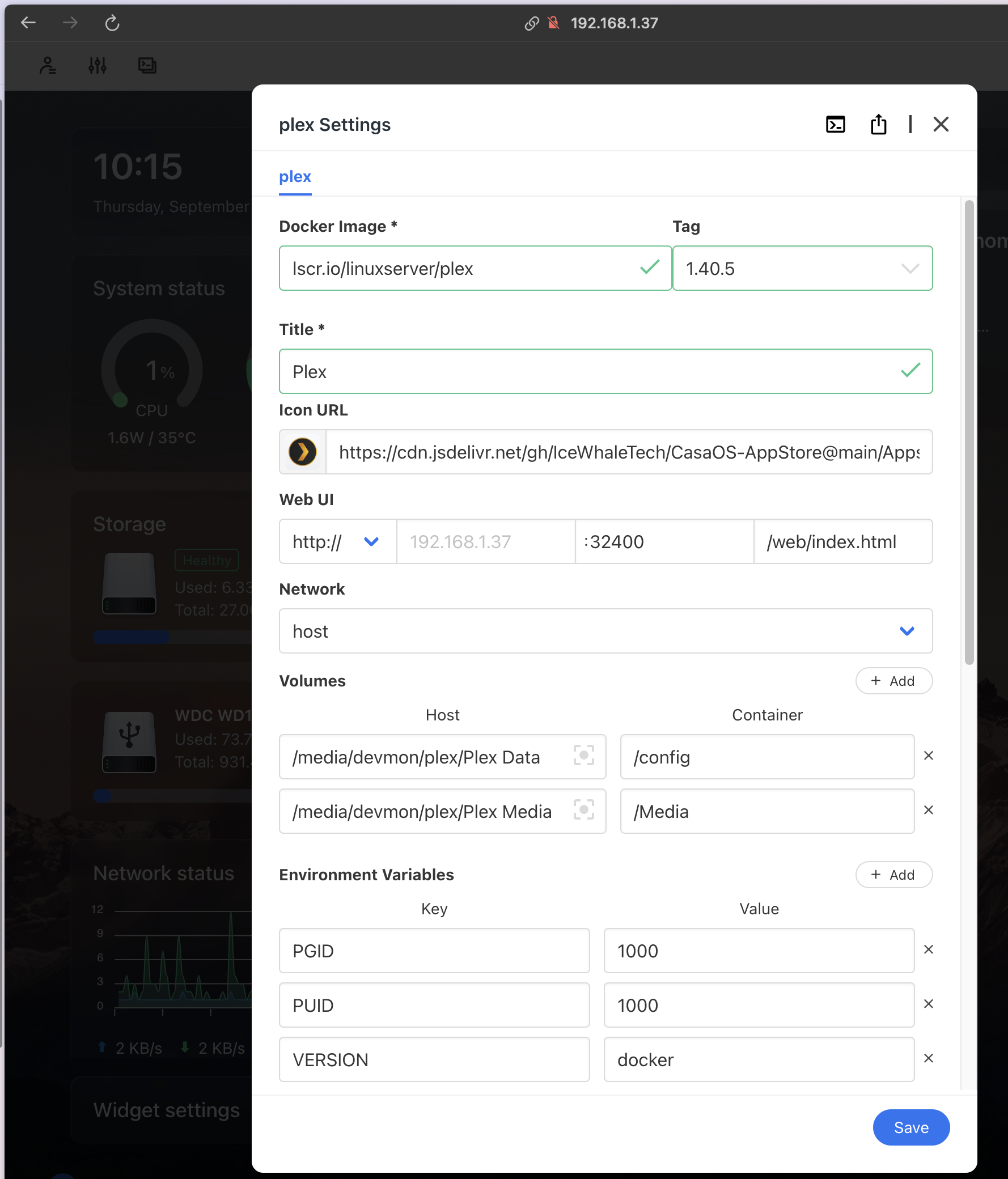
As installed, the Docker volumes are mapped to the internal disk. Plex will happily eat it for you in about 2 days.
So a USB disk is important and it should be ext4 as user:group are useful in Linux user land.
If you did things in the sequence described earlier, the disk will mount at /media/devmon/label/. Alternately, it will mount as /media/user/label/. Either should be OK. User will be the user you created during Debian installation or on the first CasaOS launch after unboxing. Either should work.
What ever you do, don’t be a good old school admin and try to run plex as user plex. You don’t need to do that. Docker will keep plex boxed in and out of mischief other than disk eating.
So there are two volume bindings to make. One for /config which I bound to /media/devmon/plex/Plex Data. And one for /media which I bound to /media/devmon/plex/Plex Media.
At this point, you can save and launch. Plex should come up on the console.

Configuring Plex
At launch, Plex should walk you through account creation or account login. You’ll need an account and a paid subscription to use Plex media and program guide. Otherwise you get what the station sends in the channel metadata.
The configuration is pretty much a regular Plex configuration. The one thing that is Docker specific is setting of library paths. Here you need to remember the mappings made when you configured the Plex Plugin.

Plex is in the container so it wants mapped paths rather than external paths. Thus the mappings are short as shown here. Movies, Music, and Photos can be mapped in the same go as TV Shows, ie. one use of this form, not four.
Using the form shown, add libraries all at once. When you have them all created, then Save Changes. This will same some time.
Note that the library path is the mapped path configured in settings. /Media is a mapped to the USB disk and directory where the media library root is located. So you’ll select /Media and add TV Shows as in /Media/TV Shows . Plex will create TV Shows for you. Same with Movies, Photos, Other Videos, etc.
Configuring the TV Tuner
The TV Turner configuration is hidden away on the wrench menu. Way down the bottom Live TV and DVR. This dialog will initially be empth with a button to search for tuners. After a bit, it will list them all (you may have several). Pick one, and fill out the questionnaire. Plex will scan for channels and return a list of available channels. You can hide the HSC and QVN channels at this point. I’d leave the others in as there are Favorites. Finish the form and exit. Plex will go about building a channel guide.
In Live TV view you can set channels as favorites and reorder the channel list.

You’ve got updates
The CasaOS environment is really subtle about indicating that updates are available. On the settings menu item a red dot will appear. That is is. No notifications to your mobile. No urgent E-mails. Just a little red dot.
So we added Cockpit which is compatible with Debian and Docker.
Then Reality Struck
The ZimaBoard turned out not to have the horsepower to transcode ATSC-3 received broadcast streams to the library encoding.
The Zima Board is in the rack shutdown until I can find a new use for it.
Plex, We have a problem …
The symptoms were Linux watch-dog timer hangs running on the Celeron. That’s the symptom on the little Celeron N3450 / J3455. Both have Intel Gen 9 HD500 embedded graphics. IceWhale chose these parts because they were looking for a small form factor and a low selling price.
Meanwhile, Plex makes no clear statement of the transcoding resources needed or the specific libraries used. Did they use OpenCL or Cuda? Do they use vendor provided libraries from Microsoft, AMD, or nVidia? They don’t say. Did they use ffmpeg and leave it up to the OS packager to get it right? They don’t say. So, how do I pick hardware? Reddit is full of Plex hardware folklore. But Reddit is the land of “Me too” and not actual horses mouth information.
Plex support is pretty thin also. I suspect they last looked at video performance requirements when ATSC 1 was rolling out. ATSC 3 is here. 4K can be broadcast, and new vector instructions and new hardware support for video transcoders has been developed and deployed.
Plex does mention that Plex Media Server will run on Free BSD 11 or newer. It will run in a jail. It will run on TrueNAS 13 Core (but jails and VMs are retired in 13.3.)
I’m in a box …
I rather like Plex and I rather like DVRs I’ve had a DVR about of one sort or another since 2002, (primordial TiVO). The latest change was to add a jail to Sherman, install Ubuntu Server 24.04 LTS by hand, and install Plex from the package repository by hand. This went smoothly. Plex is running, and we are sorting out permissions so Plex can read and write its dataset in the pool. That’s the literal part of in a box.
The metaphorical part of the box is that iX Systems is keeping the FreeBSD TrueNAS about for SOHO customers. But, they have moved to Debian for enterprise customers. Core uses FreeBSD’s Linux binary interface to run a subset of the Scale code on FreeBSD. But back porting fixes is becoming difficult and this path will become untenable at some point.
So, I need a new box for Plex …
The little half-liter systems look attractive and come with robust graphics, especially the newer AMD Zen APU parts. But there’s no data for picking them. Plex needs to add a proper statement of resources needed to the support page. This should include the
- instruction set options needed,
- vector libraries used,
- codec libraries used,
- OS versions supported
- Prerequisite packages
It’s that or loose the DVR market to TabloTV.
And a CasaOS Retirement Party?
Sadly, I’ve had to retire CasaOS. The problem was less that CasaOS was buggy. There is a big leap from classical Unix admin to care and feeding of container systems and containerized applications.

 Dismal Manor Dispatches
You must be logged in to post a comment.